게시판 목차 페이지
** list.php
<?php
    session_start();
    if(!isset($_SESSION['username'])) {
        echo "<script>alert('비회원입니다!');</script>";
        echo "<script>window.location.replace('main.php');</script>";
    }
?>
<!DOCTYPE html>
<html lang="ko">
<head>
    <meta charset="UTF-8">
    <title>Board</title>
</head>
<body>
    <div><h2>게시판</h2></div>
    <table>
        <thead>
            <tr align=center>
                <th width=70>번호</th>
                <th width=300>제목</th>
                <th width=120>작성자</th>
                <th width=120>작성일</th>
                <th width=70>조회수</th>
                <th width=70>좋아요</th>
            </tr>
       </thead>
        <?php
            $conn = mysqli_connect('localhost', 'root', 'mysql', 'board');
            #게시글 idx(번호) 역순으로 출력
            $q = "SELECT * FROM board ORDER BY idx DESC";
            $res = mysqli_query($conn, $q);

            #res의 결과를 한 행씩 출력
            while($row = mysqli_fetch_array($res)){
        ?>
            <tbody>
                <tr align=center>
                    <td><?php echo $row['idx'];?></td>
                    <!--게시판 조회기능 -> read.php 페이지로 이동-->
                    <td><a href="read.php?idx=<?=$row['idx']?>"><?php echo $row['title'];?></a></td>
                    <td><?php echo $row['name'];?></td>
                    <td><?php echo $row['udate'];?></td>
                    <td><?php echo $row['hit'];?></td>
                    <td><?php echo $row['liked'];?></td>
                </tr>
            </tbody>
       <?php } ?>
    </table>
    <!--게시판은 POST 방식 -> onclick 이벤트로 페이지 이동한다-->
    <button class=no onclick="window.location.href='write.php'">글쓰기</button>
</body>
</html>
** 구현
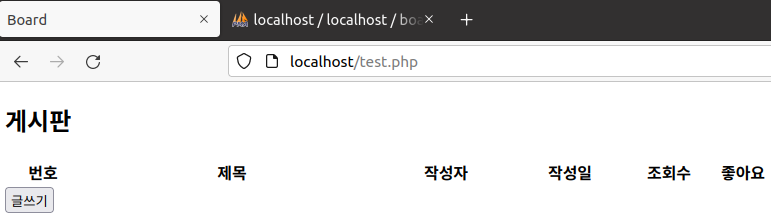
'Web Hacking Study > Web Page 만들기' 카테고리의 다른 글
| 게시판 페이지 개발 (게시글 보기, 게시글 조회수 기능) (0) | 2022.05.26 |
|---|---|
| 게시판 페이지 개발 (게시글 작성 기능) (0) | 2022.05.18 |
| 게시판 페이지 개발 (DB 만들기) (0) | 2022.05.18 |
| 주소 검색 기능 (구현 完) - 3 (0) | 2022.05.09 |
| 주소 검색 기능 (구현 未完) - 2 (0) | 2022.04.25 |


댓글