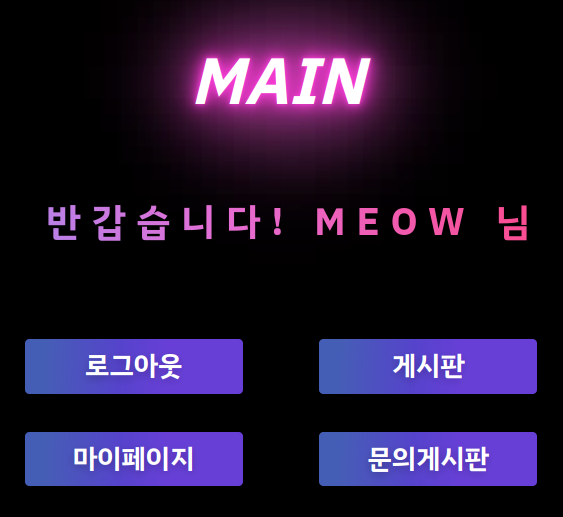
main.php에서 마이페이지로 가는 버튼을 추가한다
<div
    <button type="button" onclick="location.href='mypage.php';">마이페이지</button>
</div>
▷ mypage.php
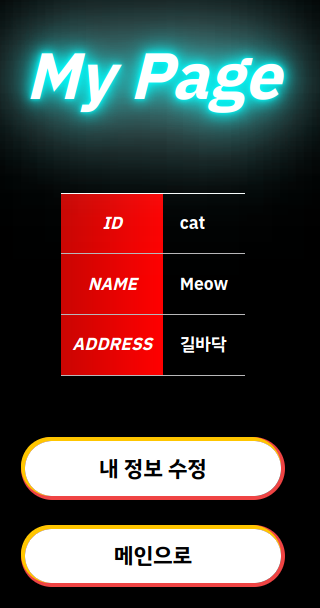
Mypage에서 로그인 된 사용자의 정보를 불러온다
[내 정보 수정하기] 버튼을 누르면 현재 비밀번호를 확인하는 페이지(check_pw.php)로 이동하도록 한다
편의상 css 뺀 코드
** mypage.php
<!DOCTYPE html>
<?php
    session_start();

    if(!isset($_SESSION['username'])) {
        echo "<script>alert('비회원입니다!');</script>";
        echo "<script>window.location.replace('main.php');</script>";
    }

    $conn = mysqli_connect('localhost', 'root', 'mysql', 'logindb');
    $login_id = $_SESSION['username'];
    $sql = "SELECT * FROM login WHERE login_id='$login_id'";
    $res = mysqli_fetch_array(mysqli_query($conn, $sql));
?>
<html lang="ko">
<head>
    <meta charset="UTF-8">
    <link href="https://fonts.googleapis.com/css2?family=IBM+Plex+Sans+KR:wght@700&display=swap" rel="stylesheet">
</head>
<body>
    <section class = "form">
        <p>My Page</p>
        <table align=center width=auto border=0 cellpadding=2>
            <tr>
                <th>ID</th>
                <td><?=$res['login_id']?></td>
            </tr>
            <tr>
                <th>NAME</th>
                <td><?=$res['name']?></td>
            </tr>
            <tr>
                <th>ADDRESS</th>
                <td><?=$res['address']?></td>
            </tr>
        </table>
        <div class = "btn-area">
            <button type="button" onclick="location.href='check_pw.php';">내 정보 수정</button>
        </div>
        <div class = "btn-area">
            <button type="button" id="signup_btn" onclick="location.href='main.php';">메인으로</button>
        </div>
    </section>
</body>
</html>
▶ 비밀번호 확인 페이지(check_pw.php) 및 확인 처리 페이지(check_pw_ok.php)
** check_pw.php
<!DOCTYPE html>
<?php
    session_start();

    if(!isset($_SESSION['username'])) {
        echo "<script>alert('비회원입니다!');</script>";
        echo "<script>window.location.replace('main.php');</script>";
    }

    $conn = mysqli_connect('localhost', 'root', 'mysql', 'logindb');
    $login_id = $_SESSION['username'];
    $sql = "SELECT * FROM login WHERE login_id='$login_id'";
    $res = mysqli_fetch_array(mysqli_query($conn, $sql));
?>
<html lang="ko">
<head>
    <meta charset="UTF-8">
    <link href="https://fonts.googleapis.com/css2?family=IBM+Plex+Sans+KR:wght@700&display=swap" rel="stylesheet">
</head>
<body>
    <section class = "form">
        <p>Check Your Password</p>
        <form method = "post" action = "check_pw_ok.php">
        <table align=center width=auto border=0 cellpadding=2>
            <tr>
                <th>ENTER THE CURRENT PASSWORD</th>
                <td><input name = "pw" type = "password" required /></td>
            </tr>
        </table>
        <div class = "btn-area">
            <button type="submit">비밀번호 확인</button>
        </div>
    </section>
</body>
</html>
** check_pw_ok.php
회원가입 할 때 비밀번호를 해시 알고리즘으로 처리하여 저장했기 때문에 check_pw.php에서 입력한 pw도 해시를 적용한다
<?php
    session_start();

    if(!isset($_SESSION['username'])) {
        echo "<script>alert('비회원입니다!');</script>";
        echo "<script>window.location.replace('main.php');</script>";
    }
    $connect = mysqli_connect('localhost', 'root', 'mysql', 'logindb');

    $login_id = $_SESSION['username'];
    $pw = $_POST['pw']; //check_pw.php에서 전달받은 pw
    $hashpass = md5($pw);

    $sql = "SELECT login_pw FROM login where login_id = '$login_id'";
    $res = mysqli_fetch_array(mysqli_query($connect, $sql));

    if($res['login_pw'] == $hashpass) {
        echo "<script>alert('비밀번호가 확인되었습니다');";
        echo "window.location.href='change_info.php';</script>";
        //비밀번호가 확인되면 모든 정보를 수정할 수 있는 change_info.php로 이동한다
    } else {
        echo "<script>alert('비밀번호가 틀렸습니다');";
        echo "window.history.back();</script>";
    }
?>
▶ 모든 정보 수정 페이지(change_info.php) 및 정보 수정 처리 페이지(change_info_ok.php)
** change_info.php
비밀번호, 닉네임, 주소를 변경할 수 있다.
post 방식으로 정보를 change_info_ok.php로 전달하여 처리한다
<!DOCTYPE html>
<?php
    session_start();

    if(!isset($_SESSION['username'])) {
        echo "<script>alert('비회원입니다!');</script>";
        echo "<script>window.location.replace('main.php');</script>";
    }

    $conn = mysqli_connect('localhost', 'root', 'mysql', 'logindb');
    $login_id = $_SESSION['username'];
    $sql = "SELECT * FROM login WHERE login_id='$login_id'";
    $res = mysqli_fetch_array(mysqli_query($conn, $sql));
?>
<html lang="ko">
<head>
    <meta charset="UTF-8">
    <link href="https://fonts.googleapis.com/css2?family=IBM+Plex+Sans+KR:wght@700&display=swap" rel="stylesheet">
</head>
<body>
    <section class = "form">
        <p>My Page</p>
        <form method = "post" action = "change_info_ok.php">
        <table align=center width=auto border=0 cellpadding=2>
            <tr>
                <th>ID</th>
                <td><?=$res['login_id']?></td>
            </tr>
            <tr>
                <th>PASSWORD</th>
                <td><input name = "pw" type = "password" placeholder="PASSWORD"/></td>
            </tr>
            <tr>
                <th>NAME</th>
                <td><input name = "name" type = "text" placeholder="NAME"/></td>
            </tr>
            <tr>
                <th>ADDRESS</th>
                <td><input name = "address" type = "text" placeholder="ADDRESS"/></td>
            </tr>
        </table>
        <div class = "btn-area">
            <button type="submit">저장</button>
        </div>
    </section>
</body>
</html>
** change_info_ok.php
<?php
    session_start();

    if(!isset($_SESSION['username'])) {
        echo "<script>alert('비회원입니다!');</script>";
        echo "<script>window.location.replace('main.php');</script>";
    }
    $connect = mysqli_connect('localhost', 'root', 'mysql', 'logindb');

    $login_id = $_SESSION['username'];
    $pw = $_POST['pw'];
    $name = $_POST['name'];
    $address = $_POST['address'];
    $hashpass = md5($pw); //change_info.php에서 전달받은 pw를 hash처리
    $sql = "SELECT * FROM login where login_id = '$login_id' ";

    if($res = mysqli_fetch_array(mysqli_query($connect, $sql))) {
        if($_POST['pw'] != NULL) {
            $new_pw = $hashpass;
        } else { //변경된 정보가 없으면 이전의 정보를 그대로 사용한다
            $pw_sql = "SELECT login_pw FROM login WHERE login_id = '$login_id'";
            $row = mysqli_fetch_array(mysqli_query($connect, $pw_sql));
            $new_pw = $row[0];
        }
        if($_POST['name'] != NULL) {
            $new_name = $_POST['name'];
        } else {
            $name_sql = "SELECT name FROM login WHERE login_id = '$login_id'";
            $row = mysqli_fetch_array(mysqli_query($connect, $name_sql));
            $new_name = $row[0];
        }
        if($_POST['address'] != NULL) {
            $new_address = $_POST['address'];
        } else {
            $address_sql = "SELECT address FROM login WHERE login_id = '$login_id'";
            $row = mysqli_fetch_array(mysqli_query($connect, $address_sql));
            $new_address = $row[0];
        }
    }
    $sql1 = "UPDATE `login` SET `login_pw` ='$new_pw', `name` = '$new_name', `address` = '$new_address'
    WHERE `login_id`='$login_id'";
    $res1 = mysqli_query($connect, $sql1);

    if($res1){
        echo "<script>alert('내 정보를 변경했습니다!');";
        echo "window.location.href='mypage.php';</script>";
    }
?>
※ 마이페이지 구현
main.php에서 mypage.php 버튼 추가
mypage.php
내 정보 수정을 클릭하면 비밀번호를 한 번 더 확인한다
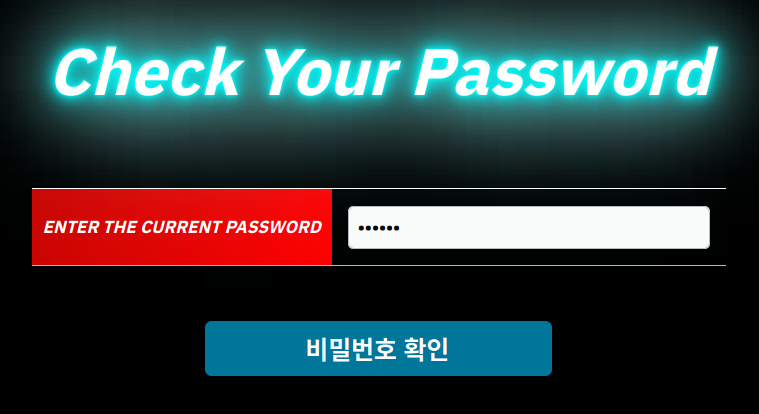
1) 틀릴 경우

2) 맞을 경우

change_info 페이지로 이동하여 정보를 수정한다

변경 완료

mypage에서 개인정보가 수정된 것을 볼 수 있다

'Web Hacking Study > Web Page 만들기' 카테고리의 다른 글
| 문의 게시판 (연락처 포함한 문의 글 작성) (0) | 2022.06.22 |
|---|---|
| 게시판 페이지 개발 (날짜, 제목, 조회 순 정렬) (0) | 2022.06.20 |
| 게시판 페이지 개발 (좋아요/좋아요 취소) (0) | 2022.06.15 |
| 게시판 페이지 개발 (파일 업로드, 파일 다운로드) (0) | 2022.06.07 |
| 게시판 페이지 개발 (게시글 검색 기능, 게시글 검색 시 기간 설정) (0) | 2022.06.06 |


댓글